
虚拟机ping不通外网,虚拟机ping不通百度

现象:宿主机与虚拟机能互相ping通,宿主机能ping通外网,但虚拟机ping不通外网
原因:vmware的网关设置有误
1)查看linux网络配置信息
- [root@localhost ~]
cat /etc/sysconfig/network-scripts/ifcfg-eth0
- DEVICE=eth0
- TYPE=Ethernet
- UUID=4af77be9-c7c7-4245-acac-afc2b7f91e49
- ONBOOT=yes
- NM_CONTROLLED=yes
- BOOTPROTO=static
- HWADDR=00:50:56:26:15:DE
- DEFROUTE=yes
- PEERDNS=yes
- PEERROUTES=yes
- IPV4_FAILURE_FATAL=yes
- IPV6INIT=no
- NAME="System eth0"
- IPADDR=192.168.137.3
- NETMASK=255.255.255.0
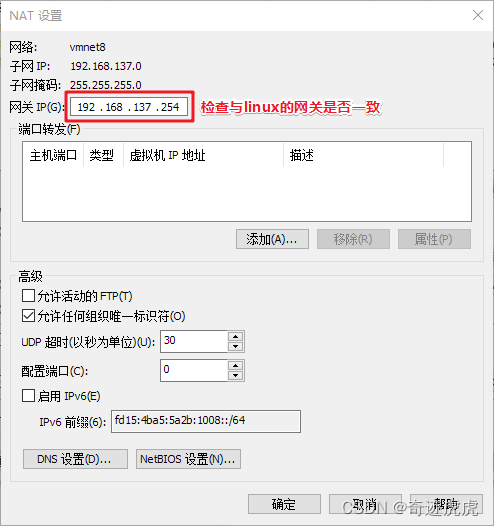
- GATEWAY=192.168.137.254 #linux网关与vmware网关需一致才行
- DNS1=114.114.114.114
- DNS2=10.111.1.2
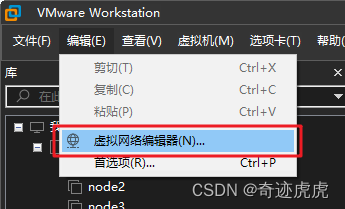
2)点击:虚拟网络编辑器
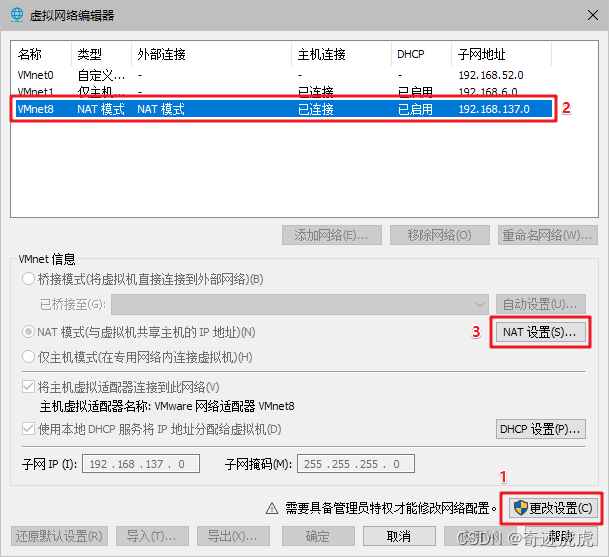
3)点击:更改设置 → VMnet8 → NAT设置
4)保持vmware网关是否与linux网关一致
5)重启网卡
- [root@localhost ~]
service network restart
- Shutting down interface eth0: [ OK ]
- Shutting down loopback interface: [ OK ]
- Bringing up loopback interface: [ OK ]
- Bringing up interface eth0: Determining if ip address 192.168.137.3 is already in use for device eth0... [ OK ]
6)ping通百度
- [root@localhost ~]
ping baidu.com
- PING baidu.com (110.242.68.66) 56(84) bytes of data.
- 64 bytes from 110.242.68.66: icmp_seq=1 ttl=128 time=60.3 ms
- 64 bytes from 110.242.68.66: icmp_seq=2 ttl=128 time=64.3 ms
0 评论
评论 (0)
登录后即可评论 去登录